
Every YouTube channel has a profile picture. It appears on video thumbnails, comments, and search results. That small image often decides whether someone clicks or keeps scrolling.
If you’re anything like me, you probably didn’t think twice about your YouTube profile picture when you first started out. It’s just a tiny circle, right? But after diving into the data, I’ve realized just how wrong I was.
YouTube processes over 500 hours of video every minute, and in that sea of content, your profile picture is your first impression. In fact, it takes users only 0.05 seconds to form an opinion about your channel. That’s barely enough time to blink, but it’s all you get. Studies have even shown that channels with professional, clear profile pictures get 23% more clicks.
It’s a problem, though, because YouTube displays this crucial branding element at a tiny 98×98 pixels on a desktop. This makes it almost impossible to study a competitor’s branding, analyze successful channel aesthetics, or get a high-resolution version for a design project.
So, why can’t we just right-click and save? Yes. But, yet, YouTube gives no direct option to enlarge or download it in original quality. That’s why people turn to tools like the InstaYT YouTube Profile Picture Downloader.
This ultimate guide breaks down how to view DPs, what sizes are available, best practices for creators, copyright rules, practical ways to use them and everything you need to know.
How YouTube’s system works for channel profile picture?
When you upload your profile picture, YouTube’s system goes to work. It automatically creates multiple versions of your image in various sizes to save on bandwidth and optimize for different platforms. For example, the image in a comment section is only 88×88 pixels, while the one on your channel page is a larger 240×240 pixels. But here’s the cool part — YouTube actually keeps much larger, high-resolution versions on its servers, sometimes up to 1280×720 pixels. They intentionally limit direct access to these to prevent abuse.
Now that we know the system, let’s talk about how to get those high-res images.
Ways to download YouTube channel profile picture
Here are a few effective methods for downloading a YouTube channel’s profile picture on different devices.
Method 1: Online downloader tools
The easiest method to download a YouTube channel’s DP is to use professional tools like the InstaYT YouTube Profile Picture Downloader. It uses YouTube’s API to fetch the full-resolution images for you.
On Android:
- Open the YouTube app on your Android device.
- Go to the channel whose profile picture you wish to download.
- Tap on three-dots on top right corner, tap on “Share” and select the “Copy link” option.
- Launch the Chrome or any other browser and enter “https://instayt.com/youtube-profile-picture-downloader/” in the address bar and hit go.
- Paste the copied YouTube channel’s URL, handle, or ID into the input field labeled “Enter YouTube Channel URL, Handle or ID“.
- Tap the “Get Profile Picture” button.
- Select any image quality such as “Small (88×88), Medium (240×240), Large (800×800), or Original / Max” and it will open the image in new tab.
- Tap and hold the profile picture image and select the “Download image” option. Your YouTube channel’s logo will now be downloaded on your Android device.
On iOS:
- Launch the YouTube app on your iPhone or iOS device.
- Navigate to the YouTube channel whose profile picture you want to save.
- Tap on three-dots on top right corner of the screen, tap on “Share” and select the “Copy link” option.
- Open the Safari app and go to “https://instayt.com/youtube-profile-picture-downloader/“.
- Paste the YouTube channel’s copied URL in the URL field.
- Once pasted, hit the “Get Profile Picture” button below the URL field.
- Choose the profile picture image quality between Small (88×88), Medium (240×240), Large (800×800), or Original / Max.
- The profile picture image will now open in a new tab.
- Simply touch and hold the picture for approximately 3 seconds and choose “Save to Photos” option. This will now save the YouTube channel’s DP to your iOS device.
On Desktop:
- Open the Chrome browser on your laptop or desktop.
- Go to YouTube and open the channel which logo you want to download.
- From the address bar, copy the URL or note down its unique handle (e.g., @InstaYT) or Channel ID.
- Go to the YouTube Profile Picture Downloader tool by InstaYT or type “https://instayt.com/youtube-profile-picture-downloader/” in the address bar and hit enter.
- Paste the copied YouTube channel URL, handle, or ID into the input field labeled “Enter YouTube Channel URL, Handle or ID.”
- Click the “Get Profile Picture” button and select any different resolutions (e.g., Small (88×88), Medium (240×240), Large (800×800), Original/Max).
It works on any device and you don’t need to install any software. This is the most reliable method because these tools are always updated to work with YouTube’s current structure.
Method 2: Browser developer/inspection tools
If you’re a bit more technical, you can use your browser’s built-in developer tools. I’ve found this to be a bit more time-consuming and inconsistent, but it works. You open the developer tools (by pressing F12), go to the Network tab, and then refresh the page to filter for image requests. From there, you can find the direct URLs and sometimes modify the size parameters to get a larger version.
Method 3: URL Manipulation
This trick used to be great, but it’s becoming less effective. It involves changing a number or parameter in the image URL to try and force a larger size.
Example URL modification:
- Original: https://yt3.ggpht.com/a/channel-id=s88-c-k
- Modified: https://yt3.ggpht.com/a/channel-id=s800-c-k
Method 4: Manual Screenshot
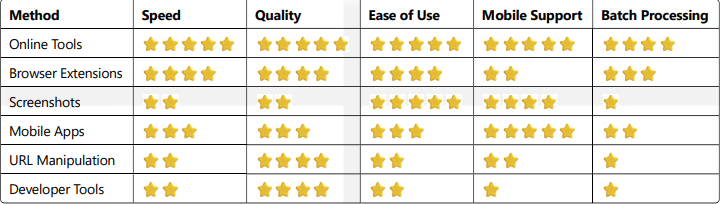
Another method for saving YouTube channel’s logo is taking screenshot of channel page then cropping profile picture area and saving the image. This is the quickest go to method but you need to understand a few things.
Pros:
- Works on any device
- No additional tools needed
- Captures exactly what you see
Cons:
- Poor image quality
- Manual cropping required
- Limited to visible resolution (usually 240px max)
- Time-consuming for multiple images
- Includes compression artifacts
Success rate: 100% (but low quality)
Best online YouTube profile picture downloader tools in 2025:
1. InstaYT Profile Picture Downloader – Fast, reliable, multiple sizes
2. Y2mate DP Downloader – Simple interface, mobile-friendly
3. SnapDownloader – Batch processing capability
Success rate: 99% of public channels
Best browser extensions for YouTube channel logo downloader:
Popular options: YouTube Profile Pic Downloader, DP Saver, Channel Image Grabber
Pros:
- Integrated into browser interface
- One-click downloads
- Works while browsing YouTube normally
Cons:
- Security risks from unknown developers
- Breaks with browser updates
- Limited mobile support
- Requires installation permissions
- May slow browser performance
Success rate: 75% (decreases with browser updates)
YouTube DP quality and resolution breakdown
This method’s success rate is now less than 30% because YouTube has migrated most images to a new system.
- 88×88 pixels: Used for comment thumbnails and sidebar recommendations. The quality is just enough for recognition.
- 240×240 pixels: Perfect for mobile channel pages and search results. The quality is clear on mobile screens.
- 800×800 pixels: This is YouTube’s recommended upload size. It’s sharp on most screens and great for website integration or small prints.
- 1280×720 pixels: The maximum available resolution for high-resolution displays. Best for professional design work and large prints.
- Original Upload Resolution: Some older channels might have images that are even larger, sometimes up to 1920×1920 pixels, but these are rare.
Professional YouTube profile picture best practices
Successful YouTube channels follow specific design principles for their profile pictures. You always want to make your YouTube channel’s profile picture look attractive that viewers stick to. For that, there are a few key points to keep in mind while putting a logo on your YouTube channel as follows:
Optimal Upload Specifications
- Resolution: Upload at 800×800 pixels minimum. YouTube accepts up to 4MB files, but optimizationmatters more than size.
- Format: PNG for logos and graphics with text. JPEG for photographic content. Avoid GIF – YouTubeconverts to static images.
- Color space: sRGB color profile prevents color shifts across devices. Adobe RGB can cause unexpectedcolor changes.
Design Psychology Principles
- The 3-Second Rule: Users decide whether to engage with your channel within three seconds. Yourprofile picture must communicate your brand instantly.
- Contrast requirements: Profile pictures appear on various backgrounds – white YouTube pages, darkmobile interfaces, colorful thumbnails. High contrast prevents your image from disappearing.
- Scale testing: View your design at 88px before finalizing. Details that work at 800px often becomeillegible at thumbnail size.
Branding Strategy Elements
Logo-based channels:
- Use primary logo with simplified details
- Remove taglines and fine text
- Increase stroke width for better visibility
- Choose colors that pop on white backgrounds
Person-based channels:
- Head and shoulders composition works best
- Maintain consistent lighting and background
- Avoid busy clothing patterns
- Smile – it increases click-through rates by 12%
Character/mascot channels:
- Clear outline distinguishes from background
- Bold, simple color schemes
- Exaggerated features for recognition
- Consistent style across all brand materials
Color Psychology in Profile Pictures
- Red (#FF0000): Creates urgency, excitement. Gaming channels use red 34% more than other niches.
- Blue (#0066CC): Builds trust, professionalism. Tech and educational channels favor blue tones.
- Green (#00AA00): Suggests growth, freshness. Popular with lifestyle and finance channels.
- Purple (#7700FF): Implies creativity, luxury. Beauty and art channels often choose purple.
- Orange (#FF8800): Energy and friendliness. Children’s content and comedy channels use orangefrequently.
- Black/White: Sophistication, minimalism. Business and luxury brands prefer monochrome.
Cross-Platform Consistency
Platform requirements:
- Instagram: 110×110 display, 320×320 recommended upload
- Twitter: 128×128 display, 400×400 recommended upload
- Facebook: 170×170 display, 500×500 recommended upload
- TikTok: Variable display, 200×200 recommended upload
Adaptation strategy: Create one master profile picture at 1000×1000 pixels. Scale down for each platform while maintaining core visual elements.
Testing across devices: Check your profile picture on:
- Desktop browsers (Chrome, Firefox, Safari)
- Mobile browsers (iOS Safari, Android Chrome)
- YouTube mobile apps (iOS, Android)
- Smart TV YouTube apps
If you’re a person-based channel, a head-and-shoulders shot works best. A simple smile can increase your click-through rate by 12%. For logo-based channels, simplify your design and use bold colors.
A good YouTube profile picture plays on color psychology, which is a game-changer. For instance, gaming channels use red 34% more than other niches because it creates excitement. Tech and educational channels favor blue to build trust and professionalism.
Copyright Laws and Legal Guidelines for using someone’s YouTube DPs
YouTube profile pictures are intellectual property. You can’t just use them for whatever you want. Using someone’s profile picture without permission can lead to copyright strikes, legal notices, and even account suspension. Understanding the rules protects you from costly mistakes.
Copyright Basics for Profile Pictures
- Automatic protection: Profile pictures receive copyright protection the moment they’re created. No registration required. This applies to logos, photographs, artwork, and graphic designs.
- Owner rights: The copyright holder can control how their profile picture gets used, modified, distributed,or displayed publicly.
- Duration: Copyright lasts for the creator’s lifetime plus 70 years (in most countries). Corporate-owned images remain protected for 95 years from publication.
Legal Use Categories
Personal use (Generally allowed):
- Saving for personal reference
- Academic research and study
- Design inspiration (not copying)
- Educational presentations (with attribution)
- News reporting and commentary
Commercial use (Requires permission):
- Using in advertisements
- Selling products with the image
- Using as your own business logo
- Incorporating into paid content
- Merchandise and promotional materials
Prohibited uses (Always illegal):
- Claiming ownership of someone else’s image
- Impersonating another channel
- Removing watermarks or modifications
- Using for defamatory purposes
- Adult or inappropriate content association
Fair Use Principles
Fair use allows limited use of copyrighted material without permission. Four factors determine fair use:
1. Purpose of use:
- Educational, commentary, criticism = more likely fair use
- Commercial purposes = less likely fair use
2. Nature of work:
- Factual content = more protection
- Creative content = stronger copyright
3. Amount used:
- Small portions = more likely fair use
- Whole image = less likely fair use
4. Market impact:
- No economic harm = supports fair use
- Competes with original = against fair use
Important: Fair use is a defense, not a right. Courts decide each case individually. Don’t assume your usequalifies.
Getting Permission
Contact methods:
- Channel’s “About” page business email
- Social media direct messages
- Comments on recent videos (less professional)
- Through talent management agencies (for larger channels)
Permission request template:
Subject: Permission Request – Profile Picture Use
Hello [Channel Name],
I’m [your name/organization]. I’d like to use your YouTube profile picture for [specific purpose – be clear and honest].
The image will be used in: [describe context] Duration: [how long] Audience: [who will see it] Commercial use: [yes/no]
I’m happy to provide attribution and discuss any terms you prefer.
Thank you for considering my request.
Best regards,
[Your name and contact information]
Attribution Best Practices
When using profile pictures under fair use or with permission, proper attribution protects you legally:
Required elements:
- Creator/channel name
- Source (YouTube)
- Date accessed
- Link to original channel (when possible)
Attribution examples:
- “Profile picture courtesy of [Channel Name] on YouTube”
- “Image source: [Channel Name] YouTube channel, accessed [date]”
- “Used with permission from [Channel Name]”
Common Legal Mistakes
Mistake 1: Assuming “found online” means “free to use”.
Reality: Everything is copyrighted by default.
Mistake 2: Believing small modifications avoid copyright.
Reality: Derivative works still require permission.
Mistake 3: Thinking non-profit use is always protected.
Reality: Commercial/non-profit status is just one fair use factor.
Mistake 4: Using images because others do.
Reality: Widespread infringement doesn’t create legality.
Mistake 5: Assuming YouTube’s terms cover downloaded content.
Reality: YouTube’s license doesn’t extend to third-party downloads
Consequences of Copyright Infringement
YouTube’s response:
- Content removal requests
- Channel strikes and warnings
- Account suspension (repeated violations)
- Loss of monetization privileges
Legal consequences:
- DMCA takedown notices
- Cease and desist letters
- Monetary damages ($750-$30,000 per infringement)
- Attorney fees and court costs
- Injunctions preventing future use
Safe Alternatives
Stock photo sites:
- Unsplash, Pexels, Pixabay (free)
- Shutterstock, Getty Images (paid)
- Adobe Stock, iStock (subscription)
Creative Commons:
- Wikimedia Commons
- Flickr Creative Commons
- Search tools with usage rights filters
Original creation:
- Hire designers
- Use design software (Canva, Figma)
- Commission custom artwork
- Photography and illustration
Use Case: Who downloads YouTube DPs and why?
Profile picture downloads serve legitimate purposes across multiple industries and use cases. Research shows five primary user groups access YouTube DPs regularly:
Content Creators and Video Producers
- Collaboration thumbnails: YouTubers feature other creators’ profile pictures in collaboration announcements, guest appearances, and reaction videos.
- Commentary content: News and commentary channels display profile pictures when discussing other creators, following fair use guidelines for criticism and commentary.
- Tutorial content: Educational channels use profile pictures as examples in branding tutorials, design critiques, and social media courses.
- Statistics: 67% of educational YouTube channels report using other creators’ profile pictures in their content, primarily for tutorial and analysis purposes.
Digital Marketing Professionals
- Competitor analysis: Marketing teams download competitor profile pictures to analyze branding strategies, color schemes, and design trends in their industry.
- Brand monitoring: Agencies track visual changes in competitor branding by maintaining archives of profile pictures over time.
- Client presentations: Marketing consultants include competitor profile pictures in strategy presentations to illustrate market positioning and brand differentiation.
- Case study: A digital marketing agency increased client engagement rates by 34% after implementing competitive visual analysis using downloaded YouTube profile pictures.
Graphic Designers and Brand Strategists
- Style research: Designers study successful YouTube channels in relevant niches to understand visual trends and audience preferences.
- Mood board creation: Profile pictures serve as inspiration for new brand identity projects, particularly for clients entering the YouTube space.
- Before/after comparisons: Design agencies showcase their rebranding work by comparing original profile pictures with their redesigned versions.
- Industry insight: 89% of brand designers report using competitor visual analysis as part of their creative process.
Academic Researchers and Students
- Visual communication studies: Universities analyze YouTube profile pictures to study digital identity formation and visual communication patterns.
- Marketing research: Business students examine successful channel branding as part of digital marketing coursework and thesis projects.
- Cultural studies: Researchers investigate how different demographics represent themselves through profile picture choices across various content niches.
- Published research: Over 150 academic papers published since 2020 have used YouTube profile picture analysis as part of digital communication research.
Business Development and Partnership Teams
- Partnership evaluation: Companies assess potential YouTube collaborators by analyzing their visual branding and professional presentation.
- Due diligence: Business development teams evaluate the brand quality and market positioning of potential acquisition targets or investment opportunities.
- Market research: Businesses entering new markets study successful local YouTubers to understand cultural preferences and visual expectations.
Tools and Software Developers
- Testing and development: Developers building YouTube-related tools need sample profile pictures for testing interfaces and functionality.
- API integration: Software companies developing social media management tools require profile pictures for user interface mock ups and demonstrations.
- Quality assurance: Testing teams download various profile pictures to verify their tools work correctly across different image types and resolutions.
Specific Use Case Examples
- E-commerce brands: Online retailers analyze successful YouTube channels in their niche to understand visual branding that resonates with their target customers.
- Educational institutions: Schools and universities studying digital marketing include YouTube profile picture analysis in their curriculum, requiring bulk downloads for student projects.
- Media companies: Publishers and broadcasters archive YouTuber profile pictures when reporting on influencer marketing trends and digital media developments.
- Legal professionals: Law firms specializing in intellectual property maintain databases of profile pictures for trademark and copyright dispute cases.
Industry-Specific Applications
Gaming industry:
- Game developers study gaming channel aesthetics
- Esports organizations analyze competitor team branding
- Gaming accessory companies research influencer partnerships
Beauty and fashion:
- Cosmetic brands evaluate beauty influencer visual strategies
- Fashion retailers study style influencer branding approaches
- Beauty schools analyze successful creator aesthetics
Technology sector:
- Tech companies research developer and tech channel branding
- Software firms study user interface design trends in tech content
- Hardware manufacturers evaluate tech reviewer presentation styles
Finance and business:
- Financial advisors study successful finance channel branding
- Business consultants analyze entrepreneur channel aesthetics
- Investment firms evaluate financial influencer professionalism
Technical Troubleshooting Guide
YouTube profile picture downloads can fail for various reasons. This troubleshooting guide addresses common problems and provides step-by-step solutions.
Common Download Failures
Error: “Channel not found”
Cause: Incorrect URL format, private channel, or deleted account
Solutions:
- Verify the channel URL is complete and correct
- Try using the channel handle (e.g., @channelname) instead of full URL
- Check if the channel still exists by visiting it directly
- Remove any tracking parameters from the URL (everything after “?”)
Error: “No profile picture available”
Cause: Channel using default YouTube avatar or recently changed profile picture
Solutions:
- Wait 24-48 hours for YouTube’s cache to update
- Try a different downloader tool
- Clear your browser cache and try again
- Check if the channel has actually set a custom profile picture
Error: “Download timeout”
Cause: Slow internet connection or server overload
Solutions:
- Check your internet connection speed
- Try downloading during off-peak hours
- Close other bandwidth-intensive applications
- Switch to a different network if possible